The short answer to STEP vs STL: a STEP file stores the exact solid geometry of a part, while an STL file stores only a surface made of triangles. Send STEP for CNC machining, injection molding and sheet metal. Use STL (or 3MF) when the only job is 3D printing. If you are unsure, send the STEP file. A good STL can be made from a STEP file in seconds, but the reverse never gives you the original model back.
That one rule settles most quoting questions. The rest of this guide explains why it works, which version of each format to export from your CAD system, and the conversion mistakes that quietly cause rework on the shop floor weeks after an order is placed.
A 3D print starts from a digital 3D model, and the file type you send decides how much of that model survives. STEP keeps the full CAD file, including units, part names and assembly structure, while STL keeps only the triangular mesh that a slicer needs to slice the model into layers.
STEP stands for Standard for the Exchange of Product model data. It is an ISO standard (ISO 10303), and the common file you export with the .step or .stp extension is defined in Part 21 of that standard. The Library of Congress format description for STEP-file (ISO 10303-21) covers the 1994, 2002 and 2016 versions.
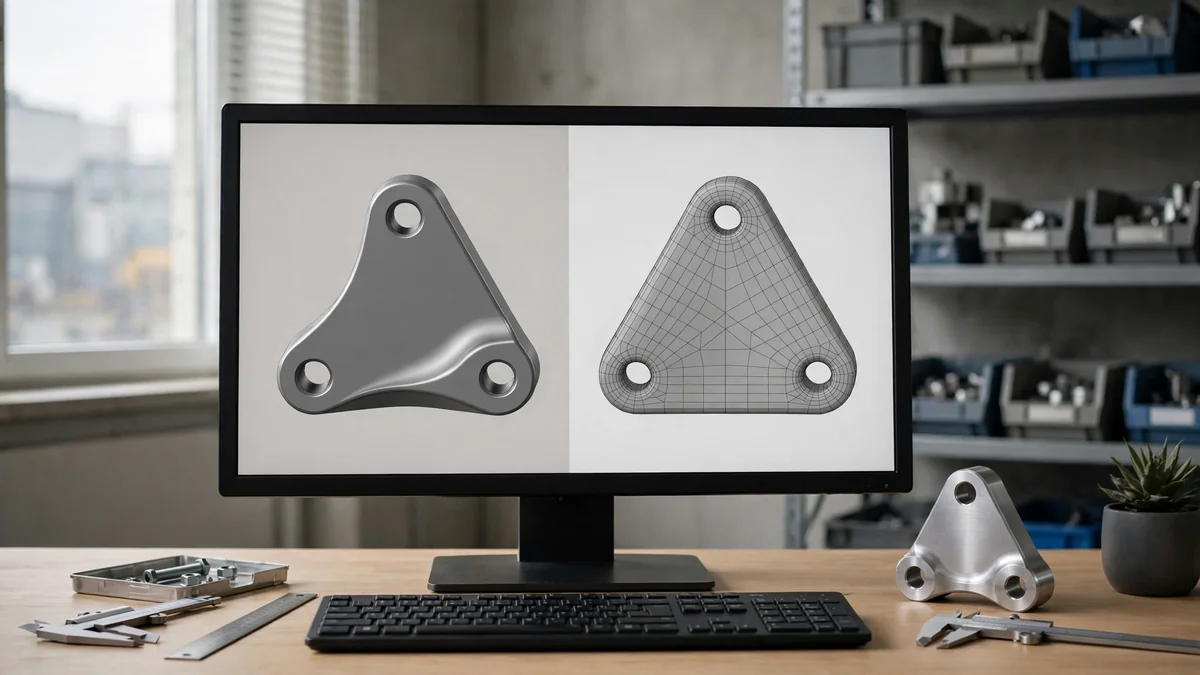
A STEP file describes a part as a boundary representation (B-rep). Faces, edges and curves are stored as mathematical surfaces, so a 10 mm hole is a true cylinder, not a polygon. The file also keeps units, part names and assembly structure.
You will see three “application protocols” in export menus:
Because the file stores exact surfaces, a parametric CAD program can use it as a reference when a design needs rebuilding, and STP files open in almost every CAD package on the market.

STL comes from stereolithography, the first commercial 3D printing process. 3D Systems created the format in 1987, and the Library of Congress STL format family description notes it was first documented in the company’s 1988 interface specification.
An STL file approximates the outside of a part with flat triangles called facets. Each facet stores three corner points and a direction vector. Nothing else: no units, no color in the standard, no material, no assembly and no design history. The file comes in ASCII and binary forms, and the binary version is far smaller.
Curves become straight segments. Accuracy therefore depends entirely on how finely the surface was triangulated during export.
STL files contain only coordinate values and direction vectors, with one vertex at each triangle corner. The STL format is an approximation of the real shape, so a smooth curve becomes a series of short straight edges, and the printed parts show fine facets when the export is coarse.
| 特点 | STEP (.step / .stp) | STL (.stl) |
|---|---|---|
| Geometry type | Exact solid (B-rep, NURBS surfaces) | Triangle mesh (facets) |
| 标准 | ISO 10303 | De facto (3D Systems, 1987) |
| Units stored | 是 | 没有 |
| Assemblies and part names | 是 | 没有 |
| Tolerances / PMI | Possible with AP242 | 没有 |
| Editable in CAD | Yes, as solid bodies | Hard; mesh only |
| Typical file size | Small for simple parts | Grows with resolution |
| 最适合 | CNC, molding, sheet metal, inspection | 3D printing, visualization |
The single biggest difference is precision. A STEP file tells the CAM software exactly where every surface is. An STL tells it roughly where the surface is, to within the chord tolerance chosen at export.
This is the part most guides skip, and it is where quoting delays come from.
CNC machining: send STEP. CAM software builds toolpaths from true surfaces. With an STL, a bore turns into a polygon and the machinist has to rebuild geometry before cutting. Add a 2D PDF drawing for any tolerance tighter than your general tolerance, threads, and surface finish callouts. Our 数控加工服务 team quotes fastest from a STEP plus drawing.
Injection molding: send STEP. Toolmakers need exact draft angles, wall thickness and parting surfaces to design the mold. An STL cannot be used for 注塑模具 without remodeling the part.
Sheet metal: send STEP, ideally exported from the sheet metal environment of your CAD so bend data survives.
3D printing: STL is fine. Slicers convert everything to triangles anyway. Many current slicers also open STEP, and 3MF is a better modern choice when you need color or multiple bodies. For 三维打印 quotes, a clean, watertight STL in millimeters is enough.
For a single 3D print, STL remains the standard 3D file format, and most 3D printing files sent to a print service are STL or 3MF file exports. A desktop 3D printer reads the same STL file as an industrial printer, so the format matters more than the machine. STL is one of the oldest file formats for 3D printing, and it still dominates additive manufacturing because every additive process starts from the mesh.
Any CAD package exports STL. What matters is the resolution setting:
Lower deviation means more triangles. A part that is 200 KB as STEP can become 20 MB as a fine STL, so there is a real trade-off between smoothness and file handling.
The result is always an approximate copy of the original solid, never the original itself. Sharing 3D models in STEP keeps the exact geometry, while the printing files you export for production are one-way conversions that cannot be reversed.
You can wrap an STL inside a STEP file, but you get a faceted solid made of thousands of tiny flat faces, not real cylinders and planes. It opens in CAD, yet holes cannot be measured as true diameters and features cannot be edited cleanly. Proper reverse engineering means rebuilding the surfaces by hand. If you only have an STL of a part that needs machining, tell your supplier up front so they can price the remodeling.
If your source is a SolidWorks part, see our guides on the SLDPRT file format and how to convert SLDPRT to STL files.
Most file trouble is avoidable, and almost all of it comes from STL exports:
One limit is worth stating plainly: how well a STEP file imports still depends on the receiving software. AP214 is the most forgiving choice when you do not know what your supplier uses.
When you compare the mesh and exchange formats side by side, the difference is what each one stores. OBJ files carry color and texture, IGES carries surfaces for CAD exchange, and STL carries only triangles. For manufacturing quotes, STEP and STL cover nearly every case, and a good CAD file in either format starts with clean geometry.
For manufacturing, yes. A STEP file holds exact solid geometry, units and assembly data, so CAM and mold design software can use it directly. STL is only a triangle approximation of the surface. STL is perfectly adequate for 3D printing, where slicers convert every model into layers of triangles anyway.
No. Both are neutral 3D formats that most CAD programs export, but they store different information. STEP describes mathematical surfaces and solids under the ISO 10303 standard. STL describes only flat triangles covering the outside of a part, with no units, color or design history.
It is possible but not recommended. CAM software needs true surfaces to calculate accurate toolpaths, especially for holes, bores and fillets. Machining from an STL usually means rebuilding geometry first, which adds cost and risk. Send a STEP file with a 2D drawing for the fastest, most accurate quote.
Yes, but the result is a faceted solid made of many small flat faces, not true curved surfaces. It will open in CAD, yet features cannot be edited or measured like the original model. Rebuilding proper surfaces requires manual reverse engineering, which takes time and should be priced separately.
Often, yes. Many current slicers, including PrusaSlicer and Bambu Studio, import STEP and convert it to a mesh internally. Exporting a fine STL or 3MF yourself still gives you more control over resolution. Check that your print service accepts STEP before relying on it.
Yes. OBJ is a common 3D printing file format, and most slicers open OBJ files alongside STL and 3MF. OBJ also carries color and texture, which STL does not, so it suits full-color prints. For CNC machining or molding, send STEP instead, because OBJ stores a mesh rather than exact solid geometry.
Pick the format based on how the part will be made. STEP is the right file for machining, molding, sheet metal and inspection because it keeps exact geometry. STL suits 3D printing and quick visual checks. When in doubt, send STEP plus a PDF drawing, and let the supplier generate a mesh if they need one.
Ready to make parts? Upload your STEP file for a free instant quote, or visit 拓维精密 查看我们提供的所有工艺。